Would you like to change your sport tracking application and keep your activities? Or maybe you use 2 or more of these services and would you like to have them synchronized? Now you can do all this with SyncMyTracks!
– What is SyncMyTracks? It's an Android app used to sync your activities of the most popular sports tracking services. You can see the list of supported services by SyncMyTracks here: http://syncmytracks.com/#compatibility
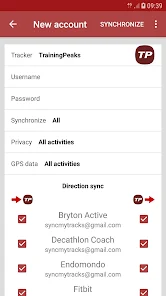
– How does export & import work? Simply entering data (email and password) of both accounts, the activities are exported from one account to the others, using GPX or TCX files.
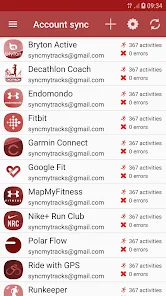
– How does account sync work? Simply add the accounts you want to sync, and SyncMyTracks will do the synchronization. If you make a new activity with any of your accounts, it automatically syncs to the others accounts. In application settings you can set the time interval wherein SyncMyTracks check for new activities, or you can disable automatic synchronization.
– Which activities are synchronized? When you synchronize a new account you can choose to synchronize all activities (activities that have already been done in the past and new activities you will do in the future) or just the new ones.
– What data is synchronized? SyncMyTracks synchronizes activity path information, such as time, duration, distance, pace and map. Also the heart rate, cadence, power and temperature are synchronized, when they are supported by different services.
– Can SyncMyTracks delete or modify my activities in synchronization? Never! SyncMyTracks just adds activities to your accounts, it doesn't delete or modify the activities that you already have.
– Can SyncMyTracks duplicate my activities in synchronization? SyncMyTracks prevents duplication of activities considering the start time of the activity.
– Where are emails and passwords of my accounts saved? SyncMyTracks stores this data on your mobile. Passwords are stored using encryption. This data is only used to connect the accounts.
– What are the differences between the free version and the paid version? In the free version, account sync is unavailable. Only you can export and import your activities. In addition, in the free version you can only export the last 40 activities at most. The paid version contains no ads.
– Can you use the export and import and synchronization with the same accounts? Not recommended, it could create duplicate activities already synchronized.
– Can you use Facebook or Google+ to login and sync my accounts? No. You must use your email and password. If password is not set, you must generate it in your account settings.
– Is SyncMyTracks sponsored, maintained or supported it by tracking services supported? No, SyncMyTracks is independent of them. Therefore, be sure to use the application on the terms and conditions detailed on their respective web sites.
Whats News of SyncMyTracks
3.14.10: - Fixed connection issues with Polar Flow.
3.14.9: - Fixed connection issues with Garmin Connect. - Added support for Garmin Connect security code verification during sign-in.
3.14.8: - Fixes for Sports Tracker / Suunto.
3.14.7: - Fixed connection issues with Garmin Connect.
3.14.5 - 3.14.6: - Fixed connection issues with Polar Flow. - Improved help text for using Samsung Health.
– How do I contact the developer of the application? Via e-mail (syncmytracks@gmail.com) or via Twitter (http://twitter.com/SyncMyTracks).
On our website, you can download the latest version of SyncMyTracks v3.14.10 APK [PAID/Patched] in APK format — fast and free! No sign-up or SMS required: direct link and verified files!
To provide the best experiences, we use technologies like cookies to store and/or access device information. Consenting to these technologies will allow us to process data such as browsing behavior or unique IDs on this site. Not consenting or withdrawing consent, may adversely affect certain features and functions.
Functional Always active
The technical storage or access is strictly necessary for the legitimate purpose of enabling the use of a specific service explicitly requested by the subscriber or user, or for the sole purpose of carrying out the transmission of a communication over an electronic communications network.
Preferences
The technical storage or access is necessary for the legitimate purpose of storing preferences that are not requested by the subscriber or user.
Statistics
The technical storage or access that is used exclusively for statistical purposes.The technical storage or access that is used exclusively for anonymous statistical purposes. Without a subpoena, voluntary compliance on the part of your Internet Service Provider, or additional records from a third party, information stored or retrieved for this purpose alone cannot usually be used to identify you.
Marketing
The technical storage or access is required to create user profiles to send advertising, or to track the user on a website or across several websites for similar marketing purposes.

![SyncMyTracks v3.14.10 APK [PAID/Patched]](https://blackmodz.com/wp-content/uploads/2026/02/48666-syncmytracks.webp)



![SyncMyTracks v3.14.10 APK [PAID/Patched]](https://play-lh.googleusercontent.com/e1xISQzxWEnNqSVnKeNX1w_Phmg_lhhyYtdoOJ1g-KcLP4qB4hVp3iCO6LX-MDbLKKY=w868)
![Sleep Cycle MOD APK v4.26.20production [Premium Unlocked]](https://blackmodz.com/wp-content/uploads/2026/05/67905-sleep-cycle-sleep-tracker.webp)
![Strava v464.8 MOD APK [Premium Subscription] for android](https://blackmodz.com/wp-content/uploads/2026/05/66834-strava-run-bike-walk.webp)
![Meditation: Lojong v3.9.7 MOD APK [Premium Unlocked]](https://blackmodz.com/wp-content/uploads/2026/02/62456-lojong-meditation-amp-relax.webp)
![Liftoff v2.11.2 MOD APK [Premium Unlocked]](https://blackmodz.com/wp-content/uploads/2026/02/48821-liftoff-ranked-gym-workouts.webp)
![Calz: Calorie Counter AI v1.28.0 MOD APK [Premium Unlocked]](https://blackmodz.com/wp-content/uploads/2026/01/39737-calz-calorie-counter-ai.webp)
![Wing Chun Trainer v404 MOD APK [Premium Unlocked]](https://blackmodz.com/wp-content/uploads/2026/02/58758-wing-chun-trainer.webp)
![Healthy Back v4.0.3 MOD APK [Premium Unlocked]](https://blackmodz.com/wp-content/uploads/2026/01/37632-straight-posture-back-exercise.webp)
![Zen: Relax, Meditate & Sleep 5.5.1 APK [Subscribed]](https://blackmodz.com/wp-content/uploads/2026/07/73482-zen-relax-meditate-amp-sleep.webp)
![StrongLifts v4.2 MOD APK [Premium Unlocked]](https://blackmodz.com/wp-content/uploads/2026/02/56639-stronglifts-5x5-workout.webp)

![Fastic AI Food Calorie Tracker v1.241.0 MOD APK [Premium Unlocked]](https://blackmodz.com/wp-content/uploads/2026/02/52354-fastic-weight-loss-amp-fasting.webp)
![Sleep Cycle v4.25.51 MOD APK [Premium Unlocked]](https://blackmodz.com/wp-content/uploads/2026/01/33929-sleep-cycle-sleep-tracker.webp)



![Dr. Kegel: For Men’s Health v1.35.0 MOD APK [Premium Unlocked]](https://blackmodz.com/wp-content/uploads/2026/01/30050-dr-kegel-for-men-s-health-bg.webp)
![Dr. Kegel: For Men’s Health v1.35.0 MOD APK [Premium Unlocked]](https://blackmodz.com/wp-content/uploads/2026/01/30050-dr-kegel-for-men-s-health.webp)
![AllTrails v26.2.10 MOD APK [Premium Unlocked]](https://blackmodz.com/wp-content/uploads/2026/02/50535-alltrails-hike-bike-amp-run-bg.webp)
![AllTrails v26.2.10 MOD APK [Premium Unlocked]](https://blackmodz.com/wp-content/uploads/2026/02/50535-alltrails-hike-bike-amp-run.webp)
![Komoot v2025.51.0 MOD APK [Premium Unlocked, Remove ads]](https://blackmodz.com/wp-content/uploads/2025/12/dekomootandroid-8807-bg.png)
![Komoot v2025.51.0 MOD APK [Premium Unlocked, Remove ads]](https://blackmodz.com/wp-content/uploads/2025/12/dekomootandroid-8807.png)
![SyncMyTracks v3.14.9 APK [PAID/Patched]](https://blackmodz.com/wp-content/uploads/2026/01/24746-syncmytracks.webp)
There are no comments yet :(